Lesson 01

Introduction to Graph Databases & Neo4j

Difficulty Beginner Time

Learning objectives

After this lesson you will be able to:

  1. Explain the property graph model: nodes, relationships, labels, types, and properties.
  2. Contrast property graphs with RDF-style triple models at a conceptual level.
  3. Describe when a graph database is a better fit than tables alone for connected data.
  4. Identify Neo4j deployment options: Desktop, self-managed server, and Aura.
  5. Use Neo4j Browser or the Query UI to run Cypher against a database.
  6. Read and run three starter queries on the classic Movie graph dataset.
  7. Locate official Cypher and GraphAcademy learning resources for the rest of the course.

Core concepts

The property graph model

A property graph stores data as a network of entities and the connections between them. Entities are nodes. Connections are relationships (also called edges). Both nodes and relationships can carry properties—key/value pairs such as name: "Tom Hanks" or roles: ["Forrest"].

Nodes are classified with one or more labels (for example :Person and :Movie). Relationships always have exactly one type (for example :ACTED_IN or :DIRECTED) and a direction from a start node to an end node. That direction is part of the stored data: walking the graph “with the arrow” is not the same as walking against it unless you write an undirected pattern later in Cypher.

Why does this model matter? Many real domains are relationship-heavy: social networks, supply chains, fraud rings, recommendation engines, dependency graphs, and knowledge panels. In a relational database you reconstruct those connections with join tables and multi-hop SQL. In a property graph, the relationship is a first-class object you can traverse, filter, and project without re-joining rows every time. You still need good modeling judgment—graphs are not magic—but the data structure matches the questions you ask: “who is two hops away?”, “what paths connect A to B?”, “which movies share cast members?”

Throughout this course we use Neo4j’s well-known Movie graph: people act in and direct films, with properties such as birth year, release year, and tagline. Keeping one concrete dataset lets every lesson reuse the same mental picture while Cypher features grow.
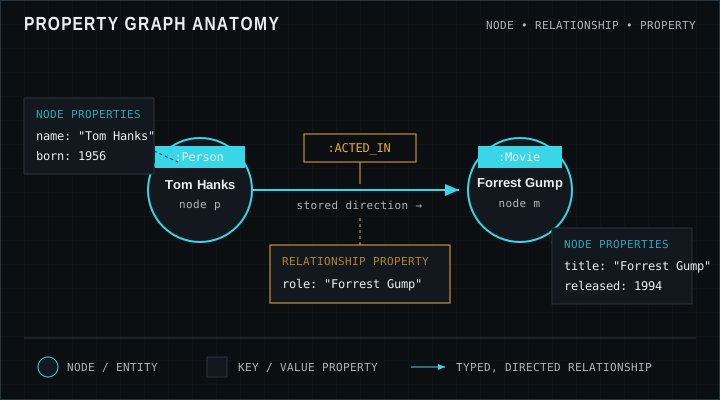
Property graph diagram: Person node Tom Hanks connected by ACTED_IN to Movie node Forrest Gump, both with sample properties
Nodes hold entity properties; the ACTED_IN relationship can store role metadata on the edge itself.

Aside: RDF versus property graphs

You may hear “graph database” used for both RDF/triple stores and property graph systems. They share the idea of connected data but optimize for different traditions. RDF models facts as subject–predicate–object triples, often with global URIs, vocabularies (RDFS/OWL), and query languages such as SPARQL. Property graphs emphasize labeled nodes, typed relationships, and property maps on both nodes and edges—closer to object graphs many application developers already sketch on whiteboards.

Neither model is universally “better.” RDF shines when shared semantics, ontologies, and open linked data are central. Property graphs shine when you need flexible local properties, intuitive multi-hop traversal for product features, and a developer-facing language like Cypher. Neo4j is a property-graph database; this course teaches you to think and query in that model without pretending RDF does not exist.

Running Neo4j: Desktop, server, and Aura

Neo4j Desktop is a local management app: create projects, spin up local database instances, open Browser, and manage plugins. It is ideal for learning and offline development. Self-managed Neo4j Server (Community or Enterprise) runs as a service you install on your own machines or VMs—full control of configuration, security, and clustering when you need it. Neo4j Aura is the fully managed cloud service: provision a database, connect with a URI and credentials, and let Neo4j operate backups, upgrades, and infrastructure.

For lessons, any of these is fine as long as you can open a query UI and run Cypher. Many learners start with Aura Free or Desktop, load the Movie dataset (or use a sandbox that already includes it), and keep that same graph open while progressing through the course.

Neo4j Browser (and the newer Query experience in some products) is the interactive console: write Cypher, run it, inspect a result table, and optionally view a force-directed graph of returned nodes and relationships. Treat it as your laboratory. Prefer explicit RETURN columns while learning so result tables stay readable; use the graph view when you want spatial intuition about connectivity.

CYPHER
MATCH (p:Person)-[r:ACTED_IN]->(m:Movie)
// p, r, m are identifiers (variables) bound by the pattern
RETURN p.name, m.title
LIMIT 5

Worked examples

Each example assumes a Movie graph with people, movies, and ACTED_IN / DIRECTED relationships. Run them in Browser against your dataset.

Dataset note: Expected results use the classic Neo4j Movie graph from the Getting Started tutorial (37 movies, 133 people). Your results can differ if you change or extend the data.

List people in the graph

Start with a node-only pattern. Match every node labeled Person, project the name property, and limit the table so you can verify the connection without flooding the UI.

CYPHER
MATCH (p:Person)
RETURN p.name
ORDER BY p.name
LIMIT 5

Expected result

p.name
Aaron Sorkin
Al Pacino
Angela Scope
Annabella Sciorra
Anthony Edwards

Who acted in which movie?

Now traverse a relationship. The pattern binds a Person, an ACTED_IN relationship, and a Movie, then returns a readable pair of columns. This is the core “follow the edge” idea of graph querying.

CYPHER
MATCH (p:Person)-[:ACTED_IN]->(m:Movie)
WHERE p.name = "Tom Hanks"
RETURN p.name, m.title
ORDER BY m.title
LIMIT 5

Expected result

p.name m.title
Tom Hanks A League of Their Own
Tom Hanks Apollo 13
Tom Hanks Cast Away
Tom Hanks Charlie Wilsons War
Tom Hanks Cloud Atlas

Directors of a specific film

Combine a relationship type with a property filter on the movie title. Even before the WHERE lesson, you can put simple equality predicates in WHERE to focus on one film—here, The Matrix.

CYPHER
MATCH (d:Person)-[:DIRECTED]->(m:Movie)
WHERE m.title = "The Matrix"
RETURN d.name AS director, m.title AS movie, m.released AS released

Expected result

director movie released
Lana Wachowski The Matrix 1999
Lilly Wachowski The Matrix 1999

Pitfalls

  • Treating relationships as anonymous joins

    Beginners sometimes model only nodes and try to fake edges with shared property IDs. That reintroduces join-table thinking and throws away relationship properties and typed traversal. If two entities are meaningfully connected, make the relationship explicit.

  • Ignoring direction when sketching the domain

    Neo4j relationships are directed. Decide what the arrow means in your domain (Person ACTED_IN Movie, not the reverse, is the Movie graph convention). You can query undirected later, but storage direction should match a clear sentence in English.

  • Confusing labels with properties

    Labels classify nodes for matching and indexing strategies; properties hold attribute data. Do not create a label per movie title. Use :Movie plus a title property instead.

  • Empty graph, puzzled learner

    A fresh database has no Movie data. Load the sample graph, run a sandbox that includes it, or create a few nodes yourself before expecting MATCH to return rows. Zero results usually mean “no match,” not “Cypher is broken.”

Exercises

  1. 1. Count movies in your graph

    Write a query that matches Movie nodes and returns how many there are. Use count(*) or count(m).

    STARTER
    MATCH (m:Movie)
    // return a single count of movies
    RETURN m
  2. 2. Return five movie titles

    Match movies and return their titles with a LIMIT of 5 so the table stays short.

    STARTER
    MATCH (m:Movie)
    // project titles and limit to 5
    RETURN m
  3. 3. Find co-actors via ACTED_IN

    Starting from a person named Tom Hanks, match movies they acted in and other people who also ACTED_IN those movies. Return distinct co-actor names (exclude Tom Hanks himself if you can).

    STARTER
    MATCH (tom:Person {name: 'Tom Hanks'})-[:ACTED_IN]->(m)<-[:ACTED_IN]-(co:Person)
    // return distinct co-actor names
    RETURN co.name
  4. 4. Sketch your own mini-domain

    On paper or in a comment block, name three node labels and two relationship types for a domain you care about (music, sports, IT assets). Then write one MATCH-style pattern string that would traverse them. No need to CREATE data yet—focus on the sentence structure of the graph.

    STARTER
    // Example pattern sketch (replace with your domain)
    // (artist:Artist)-[:PERFORMED_ON]->(track:Track)-[:ON_ALBUM]->(album:Album)
    RETURN 'your pattern here' AS sketch

Lesson quiz

Five questions. Submit once to see your score and the full answer key.

Loading quiz…

Resources

Video

Watch on YouTube (opens in a new tab).