Lesson 02

Cypher Fundamentals

Difficulty Beginner Time

Learning objectives

After this lesson you will be able to:

  1. Write MATCH patterns that bind nodes by label and relationships by type.
  2. Use RETURN to project properties, aliases, and multiple columns.
  3. Explain the role of identifiers (variables) across clauses.
  4. Read node patterns (n:Label) and relationship patterns -[r:TYPE]->.
  5. Combine person–movie patterns on the Movie graph into multi-hop reads.
  6. Apply LIMIT and ORDER BY to keep exploratory results readable.
  7. Distinguish labels on nodes from types on relationships when reading queries.

Core concepts

MATCH finds structure; RETURN shapes the table

Cypher is a declarative pattern language. You describe the shape of graph data you care about with MATCH, optionally filter with WHERE (next lesson), then RETURN the columns of your result table. Unlike imperative code that walks adjacency lists by hand, you state the pattern and let the engine choose an execution plan.

A minimal read looks like: match something, return something. Patterns live inside parentheses for nodes and square brackets for relationships. Directional arrows show which way the relationship is stored. When you write (p:Person)-[:ACTED_IN]->(m:Movie), you ask Neo4j for every pair where a Person node has an outgoing ACTED_IN relationship into a Movie node.

When to use MATCH: any time you need to read existing graph structure—dashboards, APIs, analytics, exploration. MATCH does not modify data. Empty results mean no subgraph matched your pattern; they are not errors. That distinction matters when you debug: check labels, types, direction, and whether the dataset was loaded.

RETURN produces the client-visible table. You can return whole nodes (RETURN p), properties (p.name), expressions, and aliases with AS. Prefer projecting the columns you need; returning entire large node objects is harder to read and can be expensive over the wire in applications. ORDER BY and LIMIT are your friends while learning: they stabilize examples and protect the UI from thousand-row floods.

Why patterns beat ad-hoc client traversal: application developers sometimes fetch a node by ID, then issue more queries for neighbors in a loop. That stacks latency and is easy to get wrong under concurrency. A single Cypher MATCH that describes the full subgraph you need lets the database planner use indexes and expand relationships efficiently. As patterns grow—co-actors, director–cast graphs, multi-film careers—you still express them as ASCII art of the graph rather than nested client loops.

CYPHER
MATCH (p:Person)-[r:ACTED_IN]->(m:Movie)
// identifiers p, r, m are in scope for RETURN
RETURN p.name AS actor, m.title AS film, type(r) AS relType
LIMIT 5
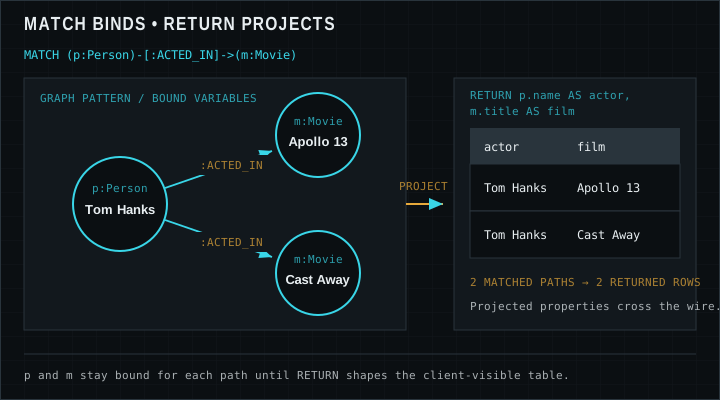
Diagram of MATCH binding Person and Movie nodes via ACTED_IN, then RETURN projecting name and title columns
MATCH binds variables to graph elements; RETURN turns selected expressions into result columns.

Node patterns, relationship patterns, labels, and identifiers

A node pattern has the form (variable:Label). The variable is optional but almost always useful. The label is optional too—bare (n) matches any node—but unlabeled scans are rarely what you want on real graphs. Multiple labels on one node are allowed in the model; matching (n:Person) still succeeds if the node also has other labels.

A relationship pattern uses square brackets: -[variable:TYPE]->. The type filter :ACTED_IN is usually essential because graphs often contain many relationship types between the same label pairs. Direction matters: the same data may not match if you reverse the arrow. Undirected patterns use a single dash without arrowheads when either orientation is acceptable for the question you are asking.

Identifiers (variables) are names like p, m, or r that hold bindings for the rest of the query. Once MATCH binds them, WHERE can filter them, RETURN can project them, and later clauses can reuse them. Choose short but meaningful names; avoid reusing the same variable for unrelated roles inside one query—especially when two Person nodes appear in a co-actor pattern.

Map-style property shorthands such as (p:Person {name: 'Tom Hanks'}) are syntactic sugar for equality predicates on properties. They are convenient for lookup patterns and appear often in documentation. Under the hood they still depend on property values existing and matching exactly—including string case. Use them for precise lookups; use WHERE when predicates get richer.

Use focused patterns with labels and types as soon as you know them. Wide open patterns can force larger scans. In later lessons you will add indexes and EXPLAIN/PROFILE; the habit of precise MATCH shapes starts here, on the Movie graph you already explored in lesson 01.

Worked examples

Dataset note: Expected results use the classic Neo4j Movie graph from the Getting Started tutorial (37 movies, 133 people). Your results can differ if you change or extend the data.

Match movies and return titles

A node-only MATCH with a label. ORDER BY keeps the table stable for teaching; LIMIT keeps Browser tidy.

CYPHER
MATCH (m:Movie)
RETURN m.title
ORDER BY m.title
LIMIT 5

Expected result

m.title
A Few Good Men
A League of Their Own
Apollo 13
As Good as It Gets
Bicentennial Man

Actors in Cloud Atlas

Bind Person and Movie through ACTED_IN, constrain the movie title, and project actor names.

CYPHER
MATCH (p:Person)-[:ACTED_IN]->(m:Movie)
WHERE m.title = "Cloud Atlas"
RETURN p.name AS actor
ORDER BY actor

Expected result

actor
Halle Berry
Hugo Weaving
Jim Broadbent
Tom Hanks

People who both directed and acted in the same film

Reuse the same person variable on two relationship types: DIRECTED into a movie and ACTED_IN that movie. This is a compact way to express “multi-hyphenate” careers without client-side joins. On the classic Movie dump this pattern returns exactly three rows (no LIMIT needed).

CYPHER
MATCH (p:Person)-[:DIRECTED]->(m:Movie)<-[:ACTED_IN]-(p)
RETURN p.name AS person, m.title AS movie
ORDER BY person, movie

Expected result

person movie
Clint Eastwood Unforgiven
Danny DeVito Hoffa
Tom Hanks That Thing You Do

Pitfalls

  • Wrong relationship direction

    If the data stores (Person)-[:ACTED_IN]->(Movie) but your query reverses the arrow, you get zero rows. Sketch the sentence “person acted in movie” and match that orientation, or use an undirected pattern when either way is fine.

  • Forgetting labels or types

    MATCH (a)-->(b) can explode combinatorially on dense graphs. Prefer (a:Person)-[:ACTED_IN]->(b:Movie) as soon as you know the model.

  • Shadowing variables

    Reusing the same identifier for different roles in one query makes results baffling. Introduce a new name when the meaning changes, especially in multi-hop patterns with two Person nodes (for example tom versus coActor).

  • Case-sensitive string equality

    Property lookups like name: 'tom hanks' fail if the stored value is Tom Hanks. Match the stored case or use case-insensitive predicates from the WHERE lesson.

Exercises

  1. 1. Relationships into The Matrix

    Match any relationship into the movie titled The Matrix and return related names and type(r).

    STARTER
    MATCH (n)-[r]->(m:Movie {title: 'The Matrix'})
    // return useful columns including type(r)
    RETURN n, type(r)
  2. 2. Films Keanu Reeves acted in

    Match Keanu Reeves via ACTED_IN to movies; return titles ordered alphabetically.

    STARTER
    MATCH (p:Person {name: 'Keanu Reeves'})-[:ACTED_IN]->(m:Movie)
    // return m.title ordered
    RETURN m
  3. 3. Alias practice

    Return person name as actor and movie title as film for any five ACTED_IN pairs.

    STARTER
    MATCH (p:Person)-[:ACTED_IN]->(m:Movie)
    // alias columns actor, film
    RETURN p.name, m.title
    LIMIT 5
  4. 4. Two-hop co-actors for Meg Ryan

    From Meg Ryan, go to a movie she acted in, then to another actor in that movie. Return Meg, the movie title, and the co-actor name. Limit to 10 rows.

    STARTER
    MATCH (meg:Person {name: 'Meg Ryan'})-[:ACTED_IN]->(m:Movie)<-[:ACTED_IN]-(co:Person)
    // return meg.name, m.title, co.name with LIMIT 10
    RETURN meg, m, co
    LIMIT 10

Lesson quiz

Five questions. Submit once to see your score and the full answer key.

Loading quiz…

Resources

Video

Watch on YouTube (opens in a new tab).