Lesson 03

Filtering with WHERE

DifficultyBeginner Time

Learning objectives

After this lesson you will be able to:

  1. Place WHERE after MATCH to keep only rows that satisfy predicates.
  2. Access properties with dot notation and compare numbers, strings, and booleans.
  3. Combine predicates with AND, OR, and NOT, using parentheses for clarity.
  4. Apply common string and math expressions inside filters and projections.
  5. Test missing data correctly with IS NULL and IS NOT NULL.
  6. Explain why equality with null does not behave like a simple true/false check.
  7. Filter Movie-graph queries by release year, names, and optional properties such as tagline.

Core concepts

WHERE: boolean filters on bound rows

MATCH draws a subgraph pattern and binds variables. WHERE then decides which of those bindings survive into later clauses. Think of MATCH as candidate generation and WHERE as row-level predicate filtering. Labels and relationship types already constrain shape; WHERE expresses everything else—ranges, string checks, existence of properties, and compound logic.

Why WHERE exists separately from patterns: patterns excel at topology (which labels, which relationship types, which direction). Predicates on property values—especially ranges and multi-clause logic—read more clearly in WHERE. You can put simple equality inside a node map pattern, but the moment you need comparisons like greater-than, OR, or null tests, WHERE is the right home.

Property access uses dot notation: m.released, p.name, m.tagline. If a property is absent, the expression yields null. Comparison operators include =, <>, <, <=, >, and >=. Logical operators are AND, OR, and NOT. Parentheses remove ambiguity when you mix AND and OR in the same filter.

String helpers you will use constantly include STARTS WITH, ENDS WITH, CONTAINS, and case folding via toLower() or toUpper(). Math operators work on numeric properties such as release years. Prefer filtering in WHERE before heavy RETURN expressions so non-matching rows can be discarded early. On the Movie graph, typical filters are “released after year Y,” “name contains substring,” and “tagline is present.”

CYPHER
MATCH (m:Movie)
WHERE m.released >= 2000
  AND m.tagline IS NOT NULL
// only movies from 2000+ that have a tagline property
RETURN m.title, m.released, m.tagline
ORDER BY m.released, m.title
LIMIT 10
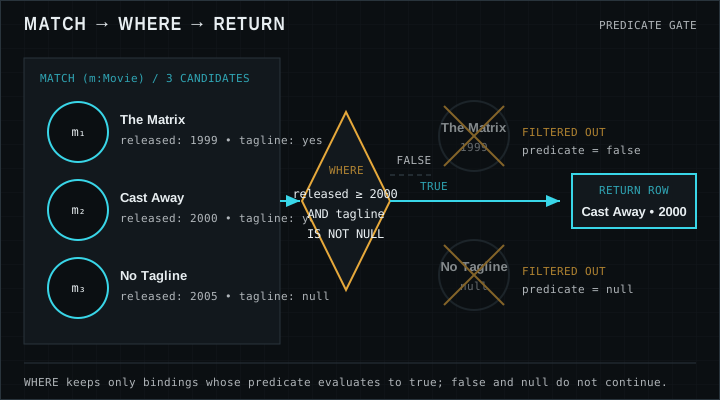
Graph pattern showing Person and Movie nodes with a WHERE filter on released year before RETURN
Only bindings that pass the WHERE predicate remain on the result path.

Null semantics: IS NULL versus equality

Missing properties are normal in flexible graphs. A movie might lack a tagline; a person might lack a birth year. Reading a missing property yields null. Comparisons involving null do not yield true: they yield null (unknown). Rows where WHERE evaluates to null are filtered out just like false. That is why WHERE m.tagline = null is the wrong way to find missing taglines—it will not keep those rows.

Use m.tagline IS NULL and m.tagline IS NOT NULL for presence tests. When you need “equals this value, or is missing,” write an explicit OR with IS NULL. Version-sensitive note: Cypher’s three-valued logic for null is stable across modern Neo4j releases, but some string-normalization and temporal functions differ—check the Cypher Manual for your server when using advanced type coercions.

Empty strings are not null; numeric zero is not null; boolean false is not null. Decide whether your application treats “missing” and “explicitly empty” the same, then encode that decision in WHERE. Filtering aggressively is appropriate for interactive exploration, API endpoints that accept user filters, and any query where unfiltered MATCH would return more rows than the client can use.

Comparison, logical, string, and math patterns

Numeric ranges power many Movie-graph questions: films after 1995, people born before 1960. String predicates power search: titles containing “Matrix”, names starting with “Tom”. Logical OR helps when a user accepts multiple alternatives; AND tightens intersection. NOT is powerful but easy to overuse—double negatives hide bugs. Keep parentheses around mixed logic so future you can read the intent in one glance.

Filtering on raw properties the database can index (exact equality, ranges) is a healthy long-term habit, though function wrappers are fine while learning on small datasets. Combine selective labels and types in MATCH with precise WHERE predicates for both correctness and performance habits you will refine later.

Worked examples

Dataset note: Expected results use the classic Neo4j Movie graph from the Getting Started tutorial (37 movies, 133 people). Your results can differ if you change or extend the data.

Movies released in or after 2000

Numeric comparison on released. Ordered by year then title for a stable teaching table.

CYPHER
MATCH (m:Movie)
WHERE m.released >= 2000
RETURN m.title, m.released
ORDER BY m.released, m.title
LIMIT 5

Expected result

m.title m.released
Cast Away 2000
Jerry Maguire 2000
The Replacements 2000
Somethings Gotta Give 2003
The Matrix Reloaded 2003

Names containing a substring

Use CONTAINS for substring search on person names. Case matters unless you normalize with toLower().

CYPHER
MATCH (p:Person)
WHERE p.name CONTAINS "Tom"
RETURN p.name
ORDER BY p.name

Expected result

p.name
Tom Cruise
Tom Hanks
Tom Skerritt
Tom Tykwer

Movies missing a tagline

IS NULL finds films where the tagline property is absent. On the classic Movie dump only one title matches; the query has no LIMIT so the table shows the full result set for that pinned graph.

CYPHER
MATCH (m:Movie)
WHERE m.tagline IS NULL
RETURN m.title, m.released
ORDER BY m.title

Expected result

m.title m.released
Somethings Gotta Give 2003

Pitfalls

  • Using = null instead of IS NULL

    Equality with null never succeeds as a true predicate. Always write IS NULL / IS NOT NULL when testing absence.

  • AND / OR precedence surprises

    Without parentheses, mixed logic can filter more or fewer rows than you intended. Parenthesize compound conditions.

  • Case-sensitive string filters

    CONTAINS "matrix" will miss "The Matrix". Match case or normalize both sides with toLower().

  • Filtering after expanding too much

    Match narrow labels/types first, then WHERE on properties. Open patterns plus late filters can be harder for planners and humans alike.

Exercises

  1. 1. Films before 1995

    Return titles with released < 1995, ordered by year.

    STARTER
    MATCH (m:Movie)
    // complete the WHERE clause for released < 1995
    RETURN m.title, m.released
  2. 2. Actors in movies released after 2005

    Combine ACTED_IN with a WHERE on m.released > 2005. Return actor, title, year.

    STARTER
    MATCH (p:Person)-[:ACTED_IN]->(m:Movie)
    // filter m.released > 2005
    RETURN p.name, m.title, m.released
    LIMIT 10
  3. 3. Titles starting with “The”

    Use STARTS WITH on m.title and return distinct titles.

    STARTER
    MATCH (m:Movie)
    // WHERE m.title STARTS WITH 'The'
    RETURN m.title
  4. 4. People born in the 1960s or missing born

    Return people where born is between 1960 and 1969 inclusive, OR born IS NULL. Explain why OR is required.

    STARTER
    MATCH (p:Person)
    // (born range) OR born IS NULL
    RETURN p.name, p.born
    ORDER BY p.name
    LIMIT 15

Lesson quiz

Five questions. Submit once to see your score and the full answer key.

Loading quiz…

Resources

Video

Watch on YouTube (opens in a new tab).