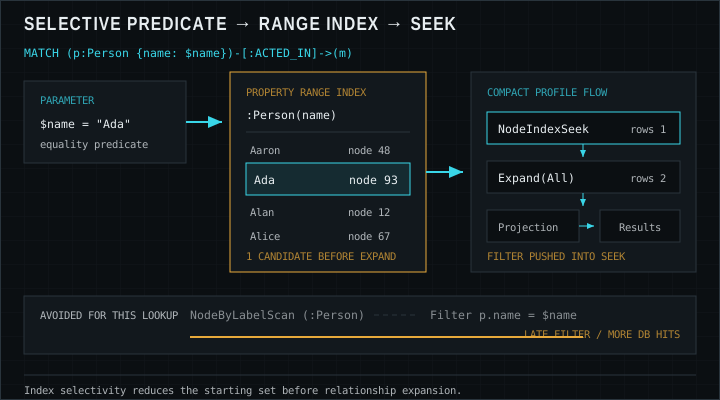
Explain what RANGE indexes accelerate and when to create them on Movie-graph properties.
Describe LOOKUP (token) indexes and how they support label and relationship-type access.
Distinguish indexes from uniqueness and existence constraints.
Use EXPLAIN to inspect a plan without executing side effects.
Use PROFILE to measure operator row counts and database hits.
Recognize common plan operators such as NodeByLabelScan, NodeIndexSeek, Expand, and Filter.
Rewrite predicates and projections so the planner can choose index-backed seeks.
Core concepts
RANGE indexes and LOOKUP indexes
Without secondary structures, finding a person by name means scanning every
Person node and filtering. That is acceptable for tiny
demo graphs and disastrous for production multi-million node stores. A
RANGE index on a property (for a label or relationship type) lets the
planner perform seeks and range scans for equality and inequality predicates on that
property. In modern Neo4j, RANGE is the default general-purpose property index type for
many workloads (text, numbers, temporals), replacing older btree naming in documentation.
Creating an index is a schema operation, for example
CREATE INDEX person_name IF NOT EXISTS FOR (p:Person) ON (p.name).
Indexes improve read performance for matching predicates but add write overhead and storage.
Index only properties you filter or join on frequently.
LOOKUP indexes (token indexes) help the database find all nodes for a label
or all relationships for a type efficiently. They are not property uniqueness mechanisms.
On current Neo4j versions, token lookup indexes are typically present by default; you still
need property indexes for selective property access paths.
Full-text and vector indexes exist for specialized search and similarity workloads. This
lesson focuses on RANGE and LOOKUP because they underpin ordinary Cypher transactional
queries on the Movie graph and most OLTP application patterns.
CYPHER
// Property RANGE index for person name lookupsCREATE INDEX person_name IF NOT EXISTSFOR (p:Person) ON (p.name);
// Property index for movie titleCREATE INDEX movie_title IF NOT EXISTSFOR (m:Movie) ON (m.title);
Constraints are not “just indexes”
A uniqueness constraint declares a business rule: at most one node with a given label and
property value. Neo4j backs uniqueness with an index so enforcement is efficient, but the
constraint is what rejects duplicates. An index alone never stops two
Person nodes from sharing the same email.
Property existence and type constraints (availability depends on edition and version)
further protect data quality. For application design, put uniqueness on natural keys early—
external ids, emails, SKUs—so imports and concurrent writers cannot fork identity. Lesson 10
returns to this theme in modeling and drivers.
Syntax sketch:
CREATE CONSTRAINT person_name_unique IF NOT EXISTS FOR (p:Person) REQUIRE p.name IS UNIQUE.
Exact keywords have evolved; consult the constraints section of the Cypher Manual for your
version. Always prefer IF NOT EXISTS in migration scripts.
EXPLAIN, PROFILE, and reading operators
EXPLAIN prefixes a query to show the planner’s chosen
operators without running the query against data (no result rows, no write effects from the
explained statement’s execution). Use it while drafting to see whether you get an index seek
or a label scan.
PROFILE executes the query and annotates each operator with
runtime metrics: how many rows flowed out, and how many database hits occurred. PROFILE is
the truth serum for performance—“I thought this was selective” becomes “Filter discarded
2 million rows after a label scan.”
Important operators to recognize:
NodeByLabelScan — visits all nodes with a label. Cheap on tiny graphs; costly on large ones when followed only by a Filter.
NodeIndexSeek / NodeIndexScan — uses a property index to find candidate nodes. Seeks are ideal for equality; scans cover ranges.
Expand(All) — walks relationships from a bound node to produce neighbors.
Filter — applies predicates that were not pushed into an index seek.
Eager aggregation or other eagerness boundaries — can materialize large intermediate sets; watch memory.
Tuning workflow: write correct Cypher first, PROFILE with realistic data volumes, ensure
selective predicates can use indexes, reduce intermediate cardinality before expansions, and
return projections instead of whole graphs. Avoid premature micro-optimization on demo data—
plans change with statistics.
Index seeks reduce candidates before expansion; label scans filter late and spend more db hits.
Worked examples
Dataset note: Expected results use the classic Neo4j Movie graph (37 movies,
133 people) and can differ if the data changes.
01
Index-friendly person lookup
Equality on an indexed property enables a seek. Run this after creating a name index; PROFILE
should show a NodeIndexSeek (or similar) rather than a pure label scan plus filter.
LIMIT 5 keeps the sample table aligned with the first five
titles in alphabetical order.
CYPHER
PROFILEMATCH (p:Person {name: 'Tom Hanks'})-[:ACTED_IN]->(m:Movie)
RETURN m.title AS title
ORDER BY title
LIMIT5
Expected result (data rows; plan is visual in Browser)
title
A League of Their Own
Apollo 13
Cast Away
Charlie Wilson's War
Cloud Atlas
02
EXPLAIN a range predicate on released year
If you create a RANGE index on Movie(released), range filters
can become index scans. Run the schema statement and the EXPLAIN
query as separate statements (Neo4j Browser treats multi-statement paste
carefully—prefer one runnable panel at a time).
CYPHER — schema (run first)
CREATE INDEX movie_released IF NOT EXISTSFOR (m:Movie) ON (m.released);
CYPHER — EXPLAIN (run separately)
EXPLAINMATCH (m:Movie)
WHERE m.released >= 2000AND m.released < 2010RETURN m.title AS title, m.released AS released
ORDER BY released, title
Expected data if the MATCH is run without EXPLAIN (all 14 rows)
title
released
Cast Away
2000
Jerry Maguire
2000
The Replacements
2000
Something's Gotta Give
2003
The Matrix Reloaded
2003
The Matrix Revolutions
2003
The Polar Express
2004
RescueDawn
2006
The Da Vinci Code
2006
V for Vendetta
2006
Charlie Wilson's War
2007
Frost/Nixon
2008
Speed Racer
2008
Ninja Assassin
2009
03
Constraint-backed uniqueness for movie titles
Demonstrate the difference: after a uniqueness constraint, a duplicate create fails. Use this
pattern for natural keys carefully—real films can share titles, so production models often use
external ids instead. Here we illustrate mechanics on the sample graph’s title field.
CYPHER
// Prefer IF NOT EXISTS in migrationsCREATE CONSTRAINT movie_title_unique IF NOT EXISTSFOR (m:Movie) REQUIRE m.title IS UNIQUE;
// This should fail if 'The Matrix' already exists// CREATE (m:Movie {title: 'The Matrix', released: 1999});MATCH (m:Movie {title: 'The Matrix'})
RETURN m.title AS title, m.released AS released
Expected result
title
released
The Matrix
1999
04
Compare plans: filter after expansion
Start from a selective person seek, expand movies, then filter by year. PROFILE should show
small row counts after the seek. Contrast mentally with matching all movies first—usually worse.
CYPHER
PROFILEMATCH (p:Person {name: 'Keanu Reeves'})-[:ACTED_IN]->(m:Movie)
WHERE m.released >= 1999RETURN m.title AS title, m.released AS released
ORDER BY released, title
Expected result
title
released
The Matrix
1999
The Replacements
2000
Something's Gotta Give
2003
The Matrix Reloaded
2003
The Matrix Revolutions
2003
Syntax cheat sheet
DDL and plan forms for indexes, constraints, and profiling.
INDEX
Create indexes
CREATE RANGE INDEX person_name IF NOT EXISTS
FOR (p:Person) ON (p.name)
CREATE INDEX person_name IF NOT EXISTS
FOR (p:Person) ON (p.name)
SHOW INDEXES
DROP INDEX person_name IF EXISTS
RANGE is the default btree-style index for equality and range seeks.
Constraint
Uniqueness constraints
CREATE CONSTRAINT person_name IF NOT EXISTS
FOR (p:Person) REQUIRE p.name IS UNIQUE
CREATE CONSTRAINT person_id IF NOT EXISTS
FOR (p:Person) REQUIRE p.id IS UNIQUE
SHOW CONSTRAINTS
Uniqueness also creates a backing index — required for safe MERGE.
Plan
Read the plan
EXPLAIN MATCH (p:Person {name: $n}) RETURN p
PROFILE MATCH (p:Person {name: $n}) RETURN p
PROFILE executes and shows db hits; look for NodeIndexSeek.
Seek
Index-friendly MATCH
MATCH (p:Person {name: $name})
MATCH (p:Person) WHERE p.name = $name
MATCH (p:Person) WHERE p.born >= 1960 AND p.born < 1970
Equality/range on indexed properties enables seeks.
Pitfalls
Assuming an index exists because “Neo4j is fast”
Demo datasets hide scans. PROFILE on production-like volumes before celebrating latency.
Indexes without constraints for identity keys
Fast lookups of a non-unique email still allow duplicates. Enforce uniqueness where identity matters.
Functions on indexed properties that block seeks
Predicates like toLower(p.name) = $n may prevent a plain
RANGE seek. Prefer storing canonical forms, or use indexes designed for the access pattern.
Tuning only with EXPLAIN
EXPLAIN cannot show that a Filter throws away millions of rows. PROFILE (on a safe environment)
validates cardinality assumptions.
Exercises
1. Create a name index
Write a schema statement that creates a RANGE index on Person.name if it does not exist, then PROFILE a name lookup.
STARTER
CREATE INDEX ...
PROFILEMATCH (p:Person {name: 'Meg Ryan'})
RETURN p.born
2. EXPLAIN a title match
EXPLAIN a query that finds a movie by title and returns its tagline. Note whether the plan mentions an index operator.