Lesson 04

Creating & Updating Data

DifficultyBeginner Time

Learning objectives

After this lesson you will be able to:

  1. Create nodes and relationships with CREATE and property maps.
  2. Use MERGE for idempotent get-or-create (upsert) patterns.
  3. Branch write behavior with ON CREATE and ON MATCH.
  4. Update properties and labels with SET; clear them with REMOVE.
  5. Delete relationships and nodes safely, including DETACH DELETE.
  6. Explain that writes commit in transactions (auto-commit vs explicit).
  7. Choose CREATE versus MERGE based on whether duplicates are acceptable.

Core concepts

CREATE always inserts; MERGE upserts

So far you only read the Movie graph. Real applications also write. Cypher’s primary construction clause is CREATE, which always constructs new nodes and/or relationships. That is perfect when you know the data is new, or when duplicates are impossible by design. It is dangerous when users click “save” twice or imports re-run: CREATE will happily insert second Tom Hanks nodes unless constraints and MERGE stop them.

MERGE is Cypher’s idempotent upsert. It tries to match a pattern; if a match exists, it binds it; if not, it creates it. For production-grade MERGE on a single node, define a uniqueness constraint on the property key you merge on (for example Person.name or a business id). Without a constraint, concurrent MERGEs can still race—constraints make the uniqueness guarantee real.

ON CREATE and ON MATCH attach SET-style actions depending on which branch MERGE took. Typical pattern: set createdAt only on create; increment a counter or set updatedAt on match. This keeps timestamps honest without overwriting creation metadata every time.

When to prefer CREATE: bulk loading known-unique rows inside a controlled import, or creating relationships between already-resolved nodes where you accept multiples (for example multiple REVIEWED edges with different ratings). When to prefer MERGE: API upserts, re-runnable migrations, and any “ensure this entity exists” workflow. MERGE of multi-node patterns can create partial pieces carefully—read the manual when merging paths, not just single nodes.

CYPHER
MERGE (p:Person {name: "Ada Lovelace"})
ON CREATE SET p.born = 1815, p.createdAt = timestamp()
ON MATCH SET p.updatedAt = timestamp()
RETURN p.name, p.born, p.createdAt, p.updatedAt
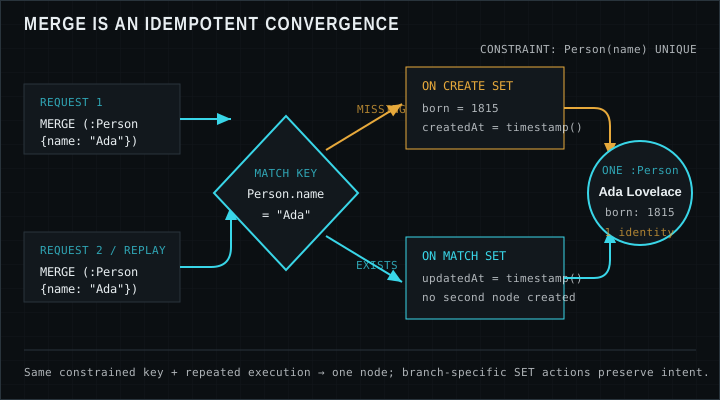
Diagram comparing CREATE always inserting a new Person node versus MERGE matching existing or creating once
MERGE matches first; only the create branch inserts a new node.

SET, REMOVE, DELETE, and DETACH DELETE

SET writes properties and can add labels (SET n:Actor). You can set multiple properties in one clause, copy property maps, and use expressions. REMOVE clears properties or labels without deleting the element. Deleting a property with SET to null is another common style; REMOVE is explicit about “drop this key.”

DELETE removes nodes or relationships you have bound. A node that still has relationships cannot be deleted with plain DELETE—the graph forbids dangling edges. Either delete the relationships first, or use DETACH DELETE, which removes the node’s relationships and then the node. Prefer explicit relationship cleanup when you need auditability; DETACH DELETE is convenient for cleanup scripts and test resets.

Writes participate in transactions. In Browser, a single query typically auto-commits on success and rolls back on error. Drivers expose explicit multi-statement transactions so several queries succeed or fail together—critical for “create person, create movie, connect them” as one unit. If any step fails, you do not want half-written graphs. Version note: transaction functions and implicit commit behavior are stable ideas, but driver APIs differ by language; see the Developer Center for your stack.

Writing relationships in the Movie graph style

Relationship writes usually MATCH or MERGE the endpoints first, then CREATE or MERGE the relationship. Example intent: ensure Keanu Reeves exists, ensure The Matrix exists, then MERGE an ACTED_IN edge with role properties. Merging relationships uses a pattern that includes both nodes and the relationship type; properties on the relationship can be set in ON CREATE / ON MATCH the same way as nodes.

Practice on a disposable database or a personal sandbox before mutating a shared learning instance. For the worked examples below, we show queries that MERGE demo entities with distinctive names so re-running them stays mostly idempotent.

Worked examples

Examples use MERGE-friendly demo names alongside the classic Movie graph so re-runs do not spam duplicates. Expected tables show plausible post-write projections.

Dataset note: Expected results use the classic Neo4j Movie graph from the Getting Started tutorial (37 movies, 133 people). Your results can differ if you change or extend the data.

MERGE a person with ON CREATE / ON MATCH

First run creates; second run updates updatedAt only (createdAt remains).

CYPHER
MERGE (p:Person {name: "Neo4j EDU Demo Actor"})
ON CREATE SET p.born = 1990, p.createdAt = 1710000000000
ON MATCH SET p.touchCount = coalesce(p.touchCount, 0) + 1
RETURN p.name AS name, p.born AS born, p.touchCount AS touchCount

Expected result

name born touchCount
Neo4j EDU Demo Actor 1990 null

After a second run of the same MERGE, touchCount becomes 1 (or increments further).

Expected result

name born touchCount
Neo4j EDU Demo Actor 1990 1

Connect a demo actor to an existing movie

MATCH The Matrix, MERGE the demo person, MERGE ACTED_IN with a roles property.

CYPHER
MATCH (m:Movie {title: "The Matrix"})
MERGE (p:Person {name: "Neo4j EDU Demo Actor"})
MERGE (p)-[r:ACTED_IN]->(m)
ON CREATE SET r.roles = ["Extra"]
RETURN p.name AS actor, m.title AS movie, r.roles AS roles

Expected result

actor movie roles
Neo4j EDU Demo Actor The Matrix ["Extra"]

SET, REMOVE, and safe cleanup

Set a temporary property, then REMOVE it. A separate DETACH DELETE can remove the demo person and edges when you finish practicing—run cleanup only when you intend to wipe the demo node.

CYPHER
MATCH (p:Person {name: "Neo4j EDU Demo Actor"})
SET p.tempNote = "practice"
REMOVE p.tempNote
RETURN p.name AS name, p.tempNote AS tempNote

Expected result

name tempNote
Neo4j EDU Demo Actor null

Pitfalls

  • CREATE duplicates on re-run

    Imports and “save” handlers that use CREATE without uniqueness checks produce twin nodes. Prefer MERGE plus constraints for entities with natural keys.

  • MERGE without a uniqueness constraint

    MERGE alone is not a complete concurrency story. Add a uniqueness constraint on the merge key for production graphs.

  • DELETE on connected nodes

    Plain DELETE fails when relationships remain. Delete edges first or use DETACH DELETE deliberately.

  • Forgetting transactions across multi-step writes

    Three separate auto-committed queries can leave partial state if the third fails. Group related writes in one transaction via your driver.

Exercises

  1. 1. MERGE a demo movie

    MERGE a Movie with title “EDU Practice Film”, ON CREATE set released to 2024, RETURN title and released.

    STARTER
    MERGE (m:Movie {title: 'EDU Practice Film'})
    // ON CREATE SET released, then RETURN
    RETURN m
  2. 2. SET a tagline

    MATCH your practice film and SET a tagline property; RETURN title and tagline.

    STARTER
    MATCH (m:Movie {title: 'EDU Practice Film'})
    // SET m.tagline = '...
    RETURN m.title, m.tagline
  3. 3. MERGE ACTED_IN to Cloud Atlas

    MERGE your demo actor to Cloud Atlas with a roles list; RETURN actor, movie, roles.

    STARTER
    MATCH (m:Movie {title: 'Cloud Atlas'})
    MERGE (p:Person {name: 'Neo4j EDU Demo Actor'})
    // MERGE ACTED_IN and set roles
    RETURN p, m
  4. 4. Cleanup with DETACH DELETE

    Write a query that DETACH DELETE the demo person and DELETE the practice movie if it has no remaining relationships (or DETACH DELETE it too). Run only when you intend to remove demo data.

    STARTER
    MATCH (p:Person {name: 'Neo4j EDU Demo Actor'})
    // DETACH DELETE p, then handle practice movie
    RETURN count(*)

Lesson quiz

Five questions. Submit once to see your score and the full answer key.

Loading quiz…

Resources

Video

Short Neo4j EDU explainer: why CREATE can duplicate nodes, what idempotent means, and how MERGE get-or-create keeps one entity.

Download MP4 · ~79s · made with Manim · Optional: Cypher MERGE on YouTube